Sunday, 31 March 2013

Best Battery!!!

I love maths ... some calculations have just more than halved the battery cost for the same performance, enjoy the post :)

I ask myself, which battery has best capacity to weight ratio?  Out comes the spreadsheet!


I went through all the 3 Cell batteries on the Hobbyking website, found the lightest for each mAmp and divided by the weight to give mAmps per gram.

The Comparison 

There a big difference between the best and worst batteries!  The best battery when compared to worst battery is 34% better, like for like that gives an extra two minutes of hovering flight.

FYI, interesting the best overall battery is in the model speed boat section.

Ultimately I'm looking at time in the air.  So what about the 6100mAh battery? It's has a worse mAh/g however it holds a third more power.

According to the eCalc website site, it estimates the best 4500 mAh battery 17.4 mins in the air where the 6100mAh battery gives 19.4 mins in the air!!!

Do we have a winner?  I thought so except a school boy error ... I forgot the cost!!!

The Cost of Power

6100mAh battery is $100 USD and the 4500mAh battery is $58 USD.  Both are a lot for a battery!

Perhaps one day I'll buy these batteries however I want to constrain the costs.  The 5500 mAh battery $96 however the 5000 mAh battery is $27 USD.  Much more like it!

My Winner

I think we have a winner!!!  It gives me more air time at 17.6 mins and half the cost of the "best" specification battery.


More interestingly this battery is light enough to parallel which that gives 24 mins of hover time with thrust left over for maneuverability.

Friday, 29 March 2013

Battery Investigation

What an amazing website this one is: eCalc

It is fantastic, all the aeronautic calculations for you!!!  It's been a big help and homed my design ... I'll write a bit more about it on another post :)

Batteries!  What to choose from?  I know I need a 3 cell battery for the right voltage yet with hundreds of 3S battery it's difficult to decide.

Lots of people on their quadcopters are using 2100 or 2500mAh.  Yes why not use that! :)

Oh dear, on the calculation website only 10 mins of hover time and about 6 mins of high powered flight :(

I need time in the air, therefore a big battery.  What's the largest 3 Cell battery on Hobbyking?  How's about a nice big 8400 mAh?


It's a beast of a battery at 640 grams yet that gives me about 21 mins of both fancy high powered flight and hovering.

One thing that was bothering me was the heavier the battery the more power needed to make the drone hover.  The more power need to keep it in the air the less we have for accelerating forward and maneuverability

Ummm, we could have a drone with a long hovering time yet not able to keep up with me.  Ummmm.

I was thinking, is this the best battery?  

The above battery is the lightest 8400mAh for that capacity and is the best (on Hobbyking) battery in terms of mAh per gram.  Are there batteries with less capacity with a better mAh per gram?  

Then I starting thinking, if I optimise the mAh per gram then this reduces the weight and we have more flying time :)  Yea!!!

Then I remembered my basic physics, I find the best mAh per gram battery and then put them in parallel !!  could then have the correct voltage and lots of power!!!  Why not 10000mAh?  Yes, this could be excellent!!!  

Time to create a spreadsheet to find out :)

Tuesday, 26 March 2013

I've Been Framed

I've been doing some basic calculations on power, weight, etc. and I released that it is time pin my flag to the mask to choose an airframe :)

Weight is critical on a hovering aircraft so let's go for a light one ... to be exact, the lightest and strongest my pocket will afford!

I've seen some airframes ... some amazing carbon fiber ones at a lovely high price, some very good looking ones however out of fiber glass or worse.  With the amount of crashing that's bound to happen, I think I'll need something stronger than fiber glass and ply wood.


So what have I chosen?  A while back I was really taken with Warthox videos ... this is amazing Quadcopter video.

It's just fantastic!  There is the option of carbon fiber however, as I'm starting out, aluminium is best.

So I've placed my order! I'm going via Flyduino and those guys are great, I placed the order yesterday evening and shipping today!

I'm so looking forward to starting to see something more physical in addition to the electronics.

Time to chose the motors, batteries and ECS :)

Saturday, 16 March 2013

Power to the People

I've been getting a bit side tracked with all the sensor issues.  Time to learn about batteries :)

Lithium Polymer, LiPo, is where it's at ... better than Nickel Metal Hydride yet cheaper than Lithium Ion.

There's a huge range of batteries from Hobbyist websites, so let's investigate what I need:

  • Light weight ... postman will love me however it's for the drone's benefit
  • Large energy capacity ... fly forever!
  • Small size
  • Cheap ... not cost me a fortune :)
I want everything!  I can't have everything :)

Something I've learned is the important of the battery "C Rating".  It stands for also how quickly you can safely drain the battery without damaging it.  Great little guide here!

What does that mean for me?

Four motors for me and lets say 20 Amps motors each = 80 Amps Continuous Discharge.  So I need a battery that will have a large capacity multiplied by"C Rating" = 80A continuous discharge.

Let's say the batteries I'm looking at have 2000mAh capacity, I therefore need it to have 80A / 2000mAh =  40 C Rating.

Voltage and Power

How much voltage do I need?  This relates to the type of motor I'm going to use!

Interesting, first to decide which are the right motors and then you'll know how much voltage you'll need.  Once you know that then you'll know which are the right batteries for you :)

So which motors?  Haha, that depends on how much power I need and that depends on the weight of the drone!

To add extra dimension, the more dynamic responsiveness I want the drone then the more instant power it'll need.  how dynamic I want the drone to move?  Plus also the money factor :)

Time to make an estimate of the drone weight!

Monday, 11 March 2013

Mainboard with chips?

Crazy weekend!  I was sweating at one point.

My lovely copy of Visual Studio Express hung during the deployment to the ArgonR1 mainboard.  Not to worry, reboot the computer and ArgonR1 and then deploy again.  Wrong.

The laptop wouldn't talk to the ArgonR1.  Was it fried?  Oh no!

I read on the forums it was best to re-flash the ArgonR1's firmware.  Great, downloaded the firmware and was ready to reset using Microsoft's MFDeploy.


Oh no, MFDeploy could not talk to the mainboard!  How then to recover?

All drivers deleted and re-installed, computer rebooted and still no joy!

Saturday blown, Sunday I was super worried.  Was the board dead?

I inspected the board just to see if there was something physically wrong with it ... that was the trick!!!

TOP TIP:  If your Gadgeteer Mainboard won't accept the deployment then do:

  1. Disconnect your Mainboard from it's power source
  2. Disconnect all modules ... except the computer power & communication module of course :)
  3. Power up the board and all will be good
Then board was the talking to MFDeploy, yea!  It was alive, I was very happy!  

With MFDeploy you can delete the current deployment, haha top idea!  Given there was some weird half deployment on the board that seemed a top idea :)

Then Visual Studio was as happy as me and was uploading programs to the ArgonR1 again :)

Excellent, I didn't have to re-flash the firmware or any other of those "risky" style operations, how fantastic.  

I love this little ArgonR1 board :)

Saturday, 9 March 2013

I2C Scratching my head

Back in the swing of the development after a time away and now scratching my head!

To recap, where am I ... sensors!!!!  Sensors are everything so the lovely drone knows what is happening.

The problem is that I need loads of sensors and not enough ports on my Gadgeteer board to connect them all.  The cunning plan is to network them together with the I2C protocol.


I'm having a big problem though :(

I just cannot get the a single sensor to talk to the Gadgeteer board!  


Not sure what to do next.

I've double checked the soldering, all good.  I've ensured the wiring is correct, all good.  Resistors on the I2C and Clock lines are good.  The C# code module code is super simple and no joy.

I think I'll have to buy an I2C Gadgeteer component just to check the module code is correct.

Saturday, 16 February 2013

Soldering fun

Finally back from my travels and back into the Drone :)


The Gadgeteer Prototyping board from Love Electronics allows a connection from the Gadgeteer main board into your own electronics.  You have to create your own Gadgeteer model however that looks relatively simple.  Fantastic!  

I have the sensors boards which I'll breadboard into the Prototype board for flexibility. I'm going to first try creating a Gadgeteer Gyroscopic sensor module :)

So I have my lovely sensor board from Love Electronics, time to solder some pins to it.  It's been quite a while since I've soldered however once back in the swing it was OK ... ish :)

Top tip for anyone, get the right end for your soldering iron!!!  


The original one was a chisel type which I discovered was too thick, then I tried a pin point one.  Much better, although it took far too long to transfer heat into the solder.

So I tried to solder the pins to the board, it was OK.


Not the best soldering however it was all electrically OK.  Yes now the pins are on the board!

Now to get the sensor onto a breadboard and hook it up on the Gadgeteer prototyping board.

I thought I'd tried another tip for the soldering iron.  Yes a thin chisel was the best :)

The jumper strip had to be soldered onto the prototype board and that was a dream with the new thin chisel.


End result: I now have my electronics for my Gadgeteer sensor.  Time to write the module software :)

Friday, 8 February 2013

Not much yet

Sadly not much drone work for a while as I've been away from home on work for while :(

Still, looking forward to getting back tomorrow and cracking on with my lovely soldering iron, yea!!!

In the meantime, very interesting video here on controlling quadcopters ... excellent!

Wednesday, 30 January 2013

Daisy, Daisy ... give me your answer do!

One of the problems concerning me was, I have many sensors and not enough connectors on the Gadgeteer Mainboard ... what am I do to?

I'd seen that the Gadgeteer board has I2C (pronounced "I Squared C") and oddly years and years (11 to be exact) I'd done some I2C development.  Basically it allows a master controller to talk up to 126 components.

Fantastic!!!  The question is how to connect I2C breakout boards to a Gadgeteer main board?  Thankfully the book Gadgeteer book I've been reading has all the information :)

Here's the plan, I'm doing to create my own Gadgeteer module.  Physically it will have three senors on it that are all connected via I2C.  I'll then write the module software so the Mainboard can connect to all three via the I2C.

Sounds hard however the module software is easy looking.  The tricky part will be the initial configuration of the sensors however once that is cracked it's happy days :)

Best of all, I can create my own modules that link to further modules.  Gadgeteer calls this "DaisyLink" which seems to be an implementation of I2C for talking to multiple devices thus removing some of the complication for me.  Great one Microsoft :)

First step, create my module ... I'll do something simple, not sure what yet :)

Sunday, 27 January 2013

Reading Time!

It was a lovely family weekend, so no drone development.

However, I did have time to read a book, "Microsoft .NET Gadgeteer: Electronics Projects for Hobbyists and Inventors"

It's been about 3 years since I've coded, it's nice to have a quick refresher plus learn a few new tricks for Gadgeteer and the .NET Micro framework.

I'm half way through and definitely can recommend the book to anyone new to low powered processor programming :)

Saturday, 26 January 2013

First Gadgeteer Program

I should have gone to bed, I was too excited to create my first Gadgeteer Program on the Argon R1 board ... here's the result :)

Thursday, 24 January 2013

Yea, electronics arrive!!!

Woop woop, the electronics are here!!!  That Argon R1 is a thing of beauty :)


Time to start learning :)

Also, Love Electronics have been a top company.

Communications has been fantastic!!!  Answering questions, keeping me informed on the delivery and being genuinely nice all round.

A pleasure buying from them! 

Wednesday, 23 January 2013

Time to lock down the design?

Time to take stock!!!

Lots of learning over the last 5 days.  There's a lot in my head right now, many thoughts about the pilot control of the drone ... must write that down.

The electronics coming which will be fun, there's more learning there!  Last part of the puzzle is connecting the Electronic Speed Control (ESC) to the Gadgeteer Mainboard.  Definitely do-able, so I'm not worried.

Once that is done, time to lock down the design.  I can't believe in 5 days this has gone from impossible to possible.

What's Needed in an Airframe?


Here's a few things I reckon I need ... will be fun to look back in a month and see how it has changed!

  • Lightweight ... I can't afford Carbon Fibre so Aluminium looks good
  • Strong ... one I don't want it to break on the first go!
  • Structural Integrity -  I want to minimise vibrations ... that will do the sensors no good.
  • Storage ... somewhere to hold the electronics, batteries and camera

Sounds a tall order ... time for more research!

I reckon the Motors and ESCs now not hard to decide on after yesterday!

The final electronics are tricky to decide.  I have a theoretical idea on how many sensors are needed however that all depends on how the real machine flies.  Let's just have some fun :)

Gyroscope Arrived

First package from Love Electronics has arrived.

I'm now the happy owner of a 3-Axis Gyroscope and super looking forward to Love Electronic's Argon R1 arriving sometime tomorrow!

Tuesday, 22 January 2013

Mystery solved ... Airframe, Motors and Control!!

Oh how fantastic!!!!  I knew I was missing something!!!

I came across this top website where it lists components that other's use, excellent!

Also there's links to other hobbyists who on their webpages list the parts they use ... I am so lucky, I love the internet age!  FYI, here's one hobbyist and here's another :)

Where I was going wrong?


I had over specified the motors, then needed over specified Electronic Speed Controls (ESCs) and also looking down the wrong path for the ESCs.

It's so easy to go down the wrong path, I was so locked into checking robotic websites and component sites that I had neglected radio controlled hobbyists.  These guys need electric motors with ESCs and there's bucket loads of affordable offerings!!!
10 or 12A motors be fine! Then ESC cost only $12 each.  Even then a 30A ESC cost < $20 each.  Oh brilliant!

I'm so happy!!!  I can get an airframe (still need to decide), I know I have a solution for the motors and yes I can get affordable ESCs, what a result of a day!

One more question:  How to interface the ESC to the Gadgeteer Mainboard?

Monday, 21 January 2013

PC setting up

Good news, I've placed the order with Love Electronics for the Argon R1, a bunch of sensors and some other tiddly bits to get myself going!  Happy days :)

Time for a bit of action, let's get the computer set up.

I've not coded for about 3 years.  I do miss it a bit so it'll be lovely to get back into the swing of it again.  

Time to install my sweet heart Visual Studio.  Simply the best development platform I've ever used!

It's just amazing Microsoft have a free version called "Express", well done! Yes a thank you to Microsoft is needed otherwise for this project I'd have to shell out £500 for Visual Studio and other (optional) £300 for the MSDN.  

FYI, (start playing the violin) back in 1999 I paid £80 for a student licence of Visual Studio version 6, that was a lot of money/pints for a student to give up :)

VS Express C# installed, tick.  What next?

Well as I discovered there's two further parts you need from Mircrosoft: the .Net MicroFrame SDK and the Gadgeteer Core.  Silly monkey forgot to install the Gadgeteer Core :)

Next is the SDKs from the manufacturers for their electronics.  I installed them from Love Electronics', GHI and Seeed, why not the others might be useful one day!

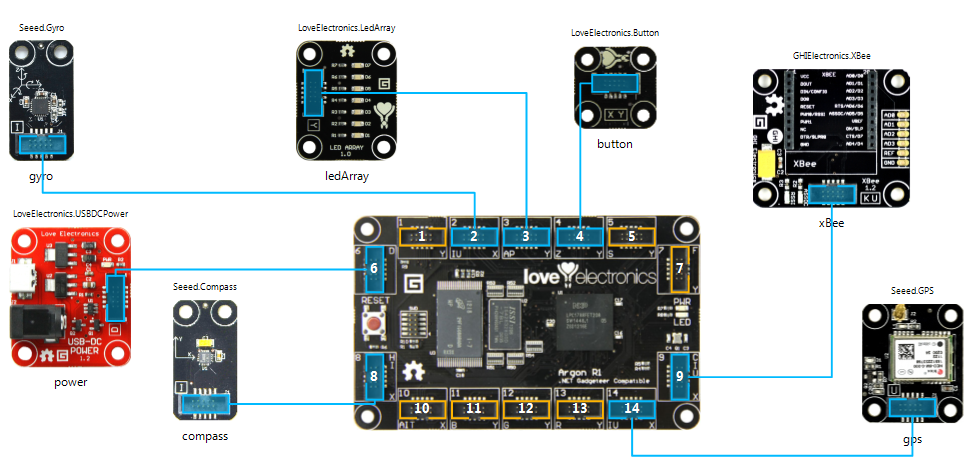
Easy evening!  Even had a bit of time for some fun Gadget layout :)


Arduino ... I've learned you could save me!

Ummmm, I think I'm mistaken about the Arduino system ... learning lots :)

More clicking about I see you can develop for it, excellent!

Arduino programs in C rather than an object orientated language so I'm still better going with the Gadgeteer board ... really a no-braining, C or C#!!!!

This complicated autopilot system will be much easier in C# however a few ideas are starting to hatch!

Perhaps, I can use the Arduino system for connecting all the sensors to?  Perhaps as a sensor pre-processing board?  Worth thinking about :)

Sunday, 20 January 2013

Which Gadgeteer Board?

Time for a break from the motors and ESC research into something more comfortable :)


The Options


There's a few manufacturers I found doing Gadgeteer Mainboards, namely: GHI Electronics, Love Electronics and Sytech Electronics.

What distinguishes the boards are three factors: Processing Power, Memory and Connectivity to other Gadgeteer modules (i.e. sensors, switches, etc).

There is of course the cost.  These boards are a bit of money but nothing prohibitively expensive, so I'll ignore the cost and buy the best one for me.

BTW, there are quite a few companies creating Gadgeteer modules and they are all meant to work with any mainboard.

So what are the best offerings from these companies:


They are all lovely boards.  For me, I'm going for the Love Electronics product.  Why?

Speed


The Spider and Nano runs at 200MHz where the Argon R1 is 120MHz, it's down on power yet that's not everything.

The drone will have an autopilot program that will be complex to write however I believe the number crunching won't be too heavy.

It is only basic simple Newton motion mathematics.  I'm not decompressing video or calculating molecule interactions.

120MHz will be great for my drone :)  Fingers crossed!

FYI, it's still so hard to understand how much "real" processing you'll get per MHz.  All the above buy their chips from NXP who implement the ARM processor version 7.  I dug around a bit, found out loads on each boards processor (won't bore you) however ultimately you never know ... will be run trying :)


Memory


This is where the Love Electronic's product wins.  FYI, there are two types of memory: RAM for your processor as a temporary storage and Flash for storage after power down.

  • Nano has 8MB of RAM and 8MB of Flash
  • Spider has 16MB of RAM and 4.5MB of Flash
  • Argon R1 has 32MB of RAM and 128MB of Flash

OK, with the Nano and Spider I could get an SD memory card and write data to that.  That's a pain, more coding and another connector taken for the SD card module.

Even if I could be bothered, the Argon R1 still has double the RAM.  I like the sound of that.

My program might not need mega data processing however I'm always surprised how much RAM one needs. Better safe than sorry. Thank you Love Electronics!

Connectors


In terms of connectors, the drone will need many for all the sensors.  As this is my fun time R&D project I don't know how many sensors I need.

At worst I'll need to put multiple sensors on each of the Quadcopter's arms ... that's 4x gyroscopes, 4x accelerometer and a GPS. Plus it will need wireless comms to get the beckon's GPS location.  That's a lot of sensors!

Also a kill button would be important for safely plus later the ultrasonics for landing.

Ummm, I need a lot of connectors and none of the boards have enough.  I will have to think of a clever way around however for now best to get as many connectors as possible.

What I found on connectors:

  • Nano is a little low on Gadgeteer connectors at 10 connectors
  • Both Love Electronics and GHI has 14 each and I believe with the same distribution of interfaces.


Summary


The race was between GHI's Spider and Love Electronics' Argon R1, sorry Nano.

The Spider probably has more processing grunt however the Argon R1 has double the RAM and over 28x more Flash memory.

The only extra on GHI is the "Premium" pack.  It allow you to do some low level programming however I really can't see myself wanting to do that :)

Yes for me with all that memory, Love Electronics has it with the Argon R1 ... sorry if I was RAMing the message home :)

Getting expensive ... Motors, ESC and interface boards

Ummmm ... still no further in solving this problem!

Brushless motors are efficient however they need expensive electronics to control them.

Do I go for brushed motors?  The control electronics are cheaper, is this a compromise I have to make?

I am missing something.  I've seen toy quadcopters sell for £300 and claim they have brushless motors  There must be cheaper control electronics.

To complicate the matter, I'm looking into interfacing the Gadgeteer computer into the motor control, doesn't look easy.  More research needed!!!

Autopilot Thoughts

The motor and controller thoughts are going around in circles, let's try something else.

Back to the Autopilot ...

This was a lovely thought exercise!  Super enjoyed this!  What does it need to do for itself?

Basic "Stuff"

Take off and then land itself.  Doesn't sound that hard: power up the motors, hoover a bit, lower the power a bit and gently glide to the ground.  Easy?

Ummm, the tricky bit is balance!!!  Forget the wind for a second, in the real world the motors will not be 100% the same, neither will the propellers (another thing I need to look into) and the drone won't be perfectly balanced.

I can't help, the drone is meant to be autonomous ... will need to balance itself.  I'll need cool sensors :)

Luckly me, the Gadgeteer platform has loads of sensors.  Gyroscopes, that's the ticket!

I'm wasn't too sure how many I'll need, perhaps four gyroscopes on each of the drone's arms?  Perhaps just one gyroscope in the centre is fine ... haha this is the real world :)

I don't really know but that is the fun of this project, I'll just have to experiment :)

Hovering


Will the GPS sensor be enough to maintain position?  Ummm, I hope so, to save my money, ... yet this is the real world!

We've all seen our phones and sat navs go crazy when the GPS signal isn't great.  Normally we cope ... so what sat nav goes crazy, I'm still driving the car.

My problem is that the drone is driving itself ... a old wise computer says, "Rubbish in, rubbish out".  How noisy is GPS data?

I need accelerometers!  Why?  The drone could be completely balanced yet falling.  If the GPS data is lost (or bad) then it's crash time!!!  Yes, accelerometers seem a good idea :)

How many, who knows?  I'm sure someone knows, but it's not me.  One in the centre is a good start but perhaps one on each drone's arm, that might help on complex flight ... ummmm more fun research!!!

Landing

My ideal super-do-per drone will have ultrasonic range finding tech on board and maybe pressure pads on the landing runners :)

I'm just concerned I'm over engineering this from the beginning.  When I build this machine, there will be a lot of testing.  The R&D phase will be in relatively ideal conditions and landing "should" be OK.

I need to limit the scope, controlled landings in non-ideal conditions is for later.  For now, GPS and accelerometers will do!  I hope I don't regret that :)

However, ultrasonics for landing is a cool idea :)  Loads of questions are firing in my mind ... I'm going to open another page on this blog just to document them ... please comment!!